Telvonic SYSTEMS
Know your PON: wavelengths and line rates
Start from the standard your ONT implements. It sets the wavelengths the optical test equipment must handle and the line rates the traffic test must reach.
| Technology | Downstream | Upstream | Line rate (down / up) |
|---|---|---|---|
| GPON (ITU-T G.984) | 1490 nm | 1310 nm | 2.488 / 1.244 Gbit/s |
| XG-PON (ITU-T G.987) | 1577 nm | 1270 nm | 9.953 / 2.488 Gbit/s |
| XGS-PON (ITU-T G.9807.1) | 1577 nm | 1270 nm | 9.953 / 9.953 Gbit/s |
| EPON (IEEE 802.3ah) | 1490 nm | 1310 nm | 1.25 / 1.25 Gbit/s |
Optical limits depend on the power-budget class of your product, for example GPON Class B+ or XGS-PON N1. Take transmit power, extinction ratio and sensitivity limits from the relevant ITU-T recommendation and your operator's specification rather than from a generic list.
Stage 1: optical tests
- Transmit power. Measure mean launch power on the upstream wavelength. ONTs transmit in bursts, so use a burst-capable power meter or a tester that triggers on the ONT's upstream bursts.
- Receiver sensitivity. Attenuate the downstream signal to the sensitivity level and confirm error-free operation; add an overload check at the high end if your quality plan requires it.
- Extinction ratio and eye. Check the transmitter eye against its mask on a digital communications analyser (DCA) — per unit or on a sampling basis, depending on your quality plan.
- Clean every connector. Dirty or damaged fibre end-faces are the most common cause of false optical failures. Inspect and clean patch cords and test ports on a fixed schedule.
Stage 2: PON registration and OMCI
- Activation. The ONT ranges and registers to an OLT — a production OLT or an OLT emulator — using its serial number and password or LOID as provisioned.
- OMCI. Confirm the ONT responds correctly to OMCI management, reports the right equipment ID and firmware version, and accepts the service configuration.
- Remote management. If your operator requires it, check the TR-069 or TR-369 (USP) connection to their management server.
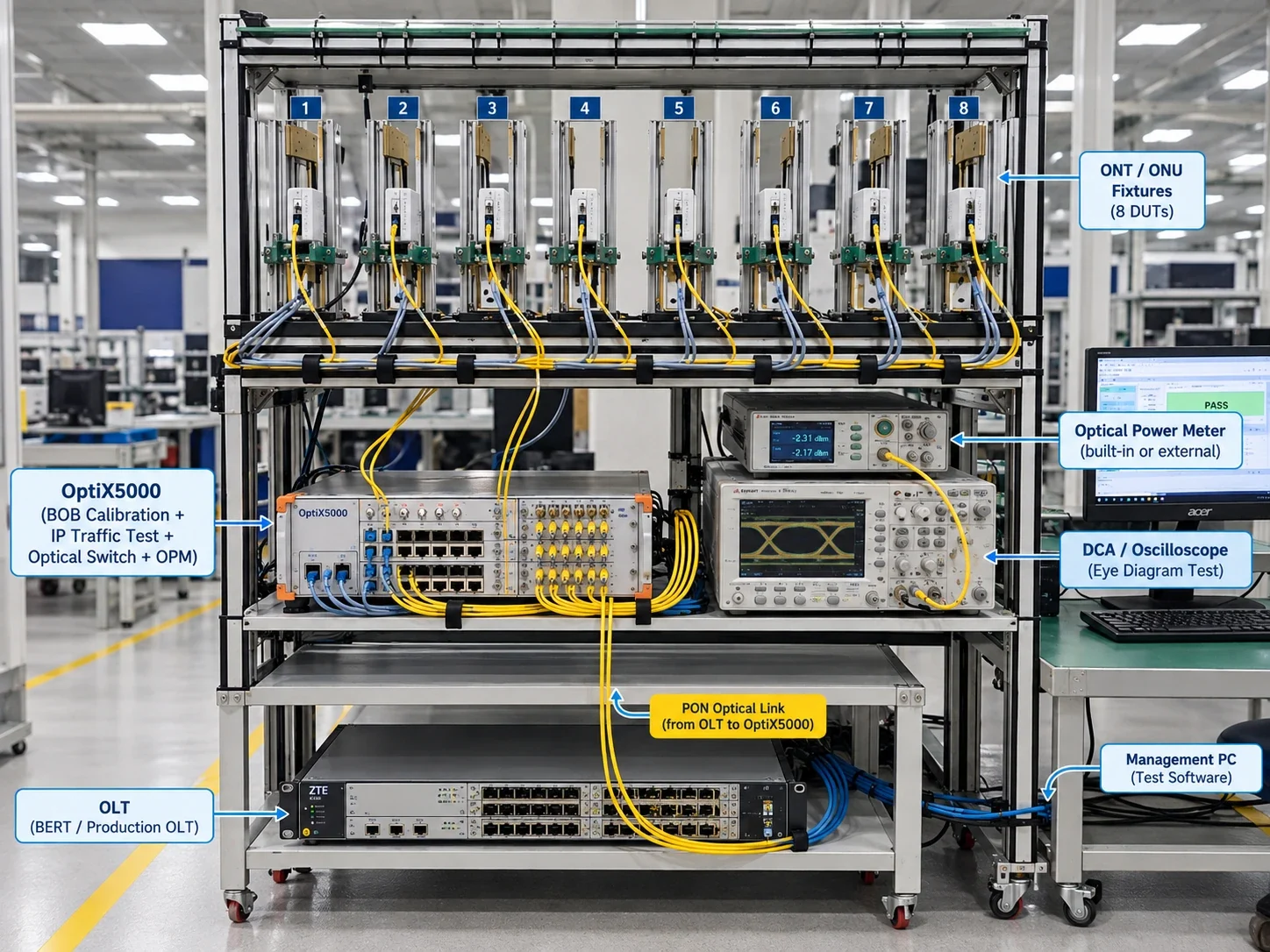
Because PON is point-to-multipoint, one OLT port can serve many DUTs through a splitter, with attenuation set per port. That's how our 16-DUT PON / ONT station shares its OLT.
Stage 3: traffic through the PON path
Run bidirectional traffic from the OLT side to each LAN port and check throughput and frame loss. Size the traffic generator for the ports you ship — 1G, 2.5G or 10G — and remember that upstream capacity is set by the PON line rate and the OLT's bandwidth allocation.
Stage 4: voice, Wi-Fi and functional checks
- Voice (POTS / FXS). Off-hook detection, dial tone, ringing and an audio loop test.
- Wi-Fi on combo ONTs. Calibrate and verify every radio as you would for a router — see Wi-Fi 7 production testing.
- Everything else. USB, LEDs, WPS and reset buttons, and the power supply.
Stage 5: identity, labels and data
Write and verify the GPON serial number, MAC addresses, default Wi-Fi credentials and configuration; print the label; and upload the full test record to your MES against the unit's serial number. A route check before test stops units that skipped an earlier process from being packed.
ONT production test checklist
- Wavelengths and line rates match the PON technology (GPON, XGS-PON, EPON)
- Optical limits taken from your power-budget class and operator spec
- Burst-capable upstream power measurement
- RX sensitivity (and overload, if required) at controlled attenuation
- Connector inspection and cleaning schedule
- OLT or OLT emulator for registration and OMCI checks
- Line-rate traffic on every LAN port
- POTS, Wi-Fi, USB, LEDs and buttons on combo units
- Identity write / verify, label print and MES upload
How Telvonic helps
Our PON / ONT test station tests 16 ONT routers at once, on two tiers of eight wired by PON fibre and LAN, above a PON tester, optical power meter, DCA and production OLT, all run by Line Manager. It's available to rent for pilot builds and ramps.