Telvonic SYSTEMS
What a VNA measures
A vector network analyzer sends a known signal into a device and measures what comes back and what comes through, in magnitude and phase, across frequency. The results are S-parameters: S11 is the reflection at port 1 (return loss), S21 is the transmission from port 1 to port 2 (insertion loss), and so on for every pair of ports.
For differential channels such as high-speed cables, a 4-port measurement is converted to mixed-mode parameters: Sdd21 for differential insertion loss, Sdd11 for differential return loss, and Scd21 for conversion from differential to common mode. A Fourier transform of the same data gives time-domain views, such as TDR impedance along a cable or a connector.
The same instrument therefore covers filters, antennas, RF cables and adapters, PCB channels, connectors and complete cable assemblies. What changes between those jobs is the frequency range, the number of ports, the dynamic range and the speed you need.
Frequency range: start from the signal
The analyzer must reach the highest frequency your part or standard is specified to. For RF parts that is the top of the band. For digital channels, a useful floor is the Nyquist frequency (half the symbol rate), with headroom above it. Compliance specifications often require measurement well beyond Nyquist, and the higher you measure, the finer the time-domain resolution.
| Application | Symbol rate | Nyquist | Typical analyzer range |
|---|---|---|---|
| Wi-Fi 6E / 7, 5G FR1 parts | RF to 7.125 GHz | – | 8.5 GHz |
| PCIe 4.0 (16 GT/s, NRZ) | 16 GBd | 8 GHz | 20 to 26.5 GHz |
| 25G and 50G per lane (802.3by, 802.3cd) | 25.8 / 26.6 GBd | 12.9 / 13.3 GHz | 26.5 GHz |
| PCIe 5.0 (32 GT/s, NRZ) and 6.0 (64 GT/s, PAM4) | 32 GBd | 16 GHz | 26.5 to 43.5 GHz |
| 100G per lane (802.3ck, PAM4) | 53.1 GBd | 26.6 GHz | 43.5 GHz or more |
| 200G per lane (802.3dj, PAM4) | 106.25 GBd | 53.1 GHz | 67 GHz or more |
| 5G FR2 and mmWave parts | RF to about 52 GHz | – | 67 GHz, or 110 GHz with extenders |
The table is a starting point, not a substitute for the standard: check the frequency range your specification actually sets for each measurement. If a 43.5 GHz analyzer can later be upgraded to 67 GHz, that is often cheaper than buying for tomorrow's data rate today.
Port count: two, four or many
- 2 ports cover single-ended two-port parts: filters, attenuators, RF cables, adapters and antennas (with one port).
- 4 ports are the minimum for one differential pair end to end, and give the mixed-mode parameters directly.
- Multiport analyzers (8 to 24 ports) measure parts with many ports, such as duplexers, switches and antenna arrays, or test several two-port parts in parallel on one instrument.
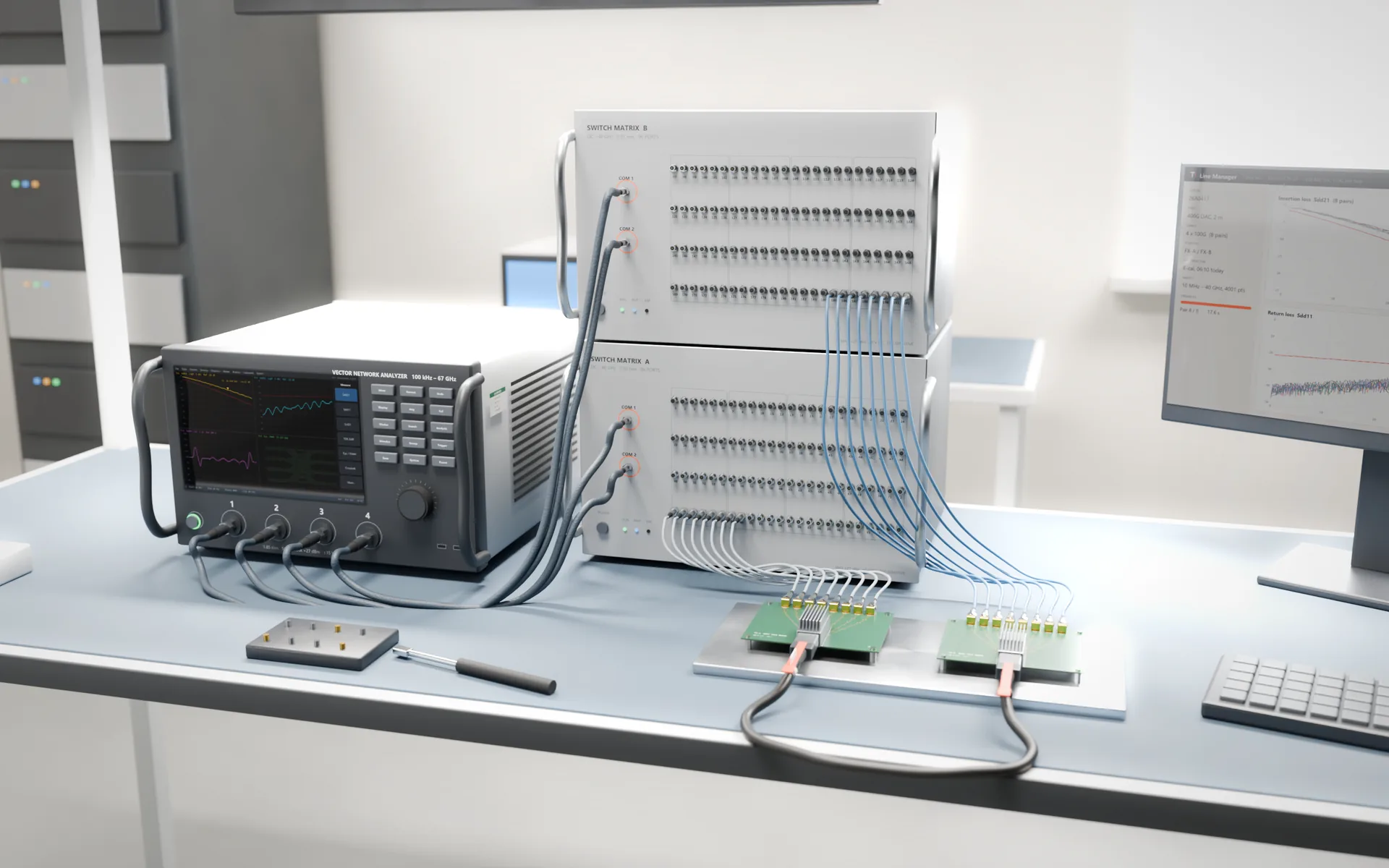
- A 4-port analyzer with a switch matrix reaches every pair of a multi-lane cable from one hook-up. Each switch path adds loss and must be calibrated, but it removes manual re-cabling, which is the slowest and least repeatable step in cable test.
A true multiport analyzer has a receiver behind every port, so it measures faster and with less loss than a switched setup of the same size. A switch matrix is the economical way to reach dozens or hundreds of ports.
Dynamic range and trace noise
Dynamic range is the difference between the strongest and the weakest signal the analyzer can measure at a given IF bandwidth. It sets how deep you can see: the stopband of a filter, the isolation of a switch, or crosstalk between pairs in a cable, which can sit 50 to 70 dB below the signal. Leave a margin of at least 10 dB between the deepest value you must measure and the noise floor.
Dynamic range trades against speed. Narrowing the IF bandwidth by a factor of ten lowers the noise floor by about 10 dB but makes each point slower to measure. Trace noise, quoted in mdB rms, matters most when you measure small losses or need tight repeatability between stations.
Speed: points, IF bandwidth and sweep time
In production, measurement time is cost. A rough sweep time is the number of points divided by the IF bandwidth, plus switching and settling overhead: 4,001 points at 10 kHz is about 0.4 s per sweep. A full 4-port measurement needs a sweep for each source port, and a switched cable test repeats that for every pair.
- Use as few points as the measurement allows. The frequency step sets the longest time window you can view without aliasing (1 / step: a 10 MHz step gives 100 ns), so long cables need finer steps.
- Use the widest IF bandwidth that still clears your dynamic range target, and narrow it only in the bands where you need depth.
- Count everything: calibration time per shift, operator handling and data upload often take longer than the sweep itself.
Calibration: SOLT, TRL and e-cal
Calibration removes the systematic errors of the analyzer, its cables and any switch paths, so the result describes the device rather than the test setup.
- SOLT (short, open, load, thru) with a mechanical kit is the common coaxial method. It is accurate but slow, and every connection is a chance for error.
- TRL (thru, reflect, line) suits fixtures and boards where coaxial standards can't reach the reference plane.
- Electronic calibration (e-cal) modules switch their standards internally, so each port pair needs one connection. Calibration becomes faster and more repeatable, which matters most for multiport and switched setups.
- De-embedding removes a characterised fixture from the result and moves the reference plane to the device, for example to the connector of a cable under test.
Plan for verification too: measure a check standard (a known cable or attenuator) at the start of each shift and recalibrate when it drifts, rather than on a fixed clock.
Connectors: match the frequency
| Connector | Rated to | Mates with |
|---|---|---|
| Type N (precision) | 18 GHz | Type N |
| 3.5 mm | 26.5 GHz | SMA, 2.92 mm |
| 2.92 mm | 40 GHz | 3.5 mm, SMA |
| 2.4 mm | 50 GHz | 1.85 mm |
| 1.85 mm | 67 GHz | 2.4 mm |
| 1.0 mm | 110 GHz | 1.0 mm |
Test ports are expensive to repair, so fit connector savers and replace those instead. Always tighten with a torque wrench: 0.9 N·m (8 lbf·in) is standard for 3.5, 2.92, 2.4 and 1.85 mm connectors, and 0.56 N·m (5 lbf·in) for SMA. Over-tightening damages the interface; under-tightening ruins repeatability.
Software and automation
For R&D, the analyzer's own interface and options matter most: time domain, fixture removal, mixed-mode conversion and eye-diagram analysis. For production, check that the analyzer can be controlled remotely (SCPI over LAN), that drivers exist for your test software, and that results can be saved as Touchstone files with the serial number of each part.
The test software should apply the limits, compute derived figures such as ILD, ICN, COM or ERL where your standard requires them, and pass a clear pass or fail to the operator and the MES. That layer usually decides throughput and traceability more than the instrument does.
A buying checklist
- Highest frequency your standard or part requires, with headroom and an upgrade path
- Ports: 2, 4, multiport, or 4 plus a switch matrix for multi-lane cables
- Dynamic range at your production IF bandwidth, at the top of the band, after fixture and switch losses
- Sweep time for your points and IF bandwidth, measured on your own part
- Calibration method: mechanical kit, e-cal, TRL; and the de-embedding you need
- Connector family, test-port cables, adapters, connector savers and a torque wrench
- Remote control, drivers and data format for your test software and MES
- Annual calibration, service turnaround and loan units in your country
The most reliable test is a demonstration on a sample of your own part, with your limits, at production speed. Ask us for one, or see the analyzers from 8.5 to 110 GHz and the cable test system built around them.